Docs
Use Kavibay, connect your accounts, build your own widgets — pick your path below.
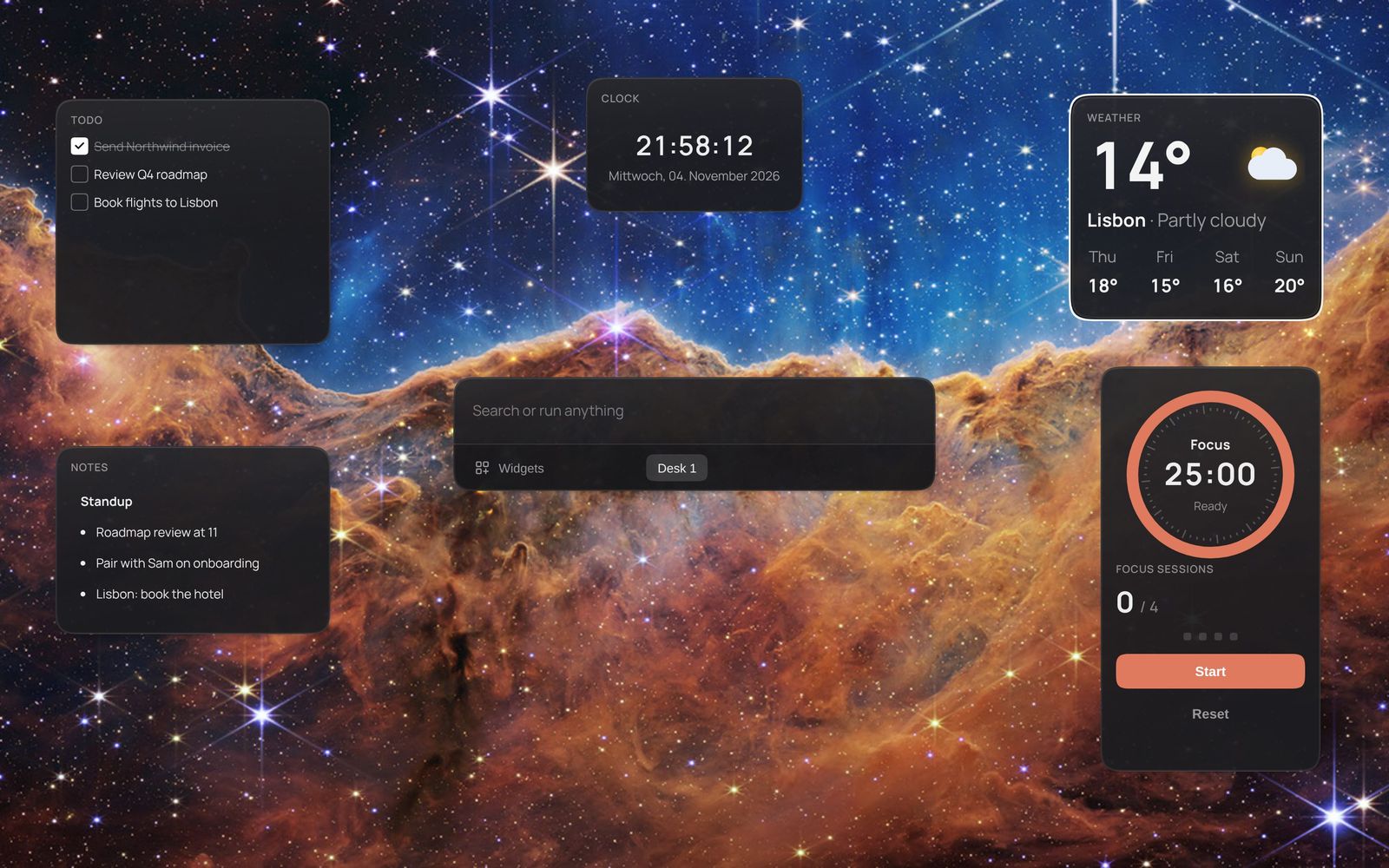
Kavibay is one transparent, always-on-top window between you and your wallpaper. It holds a fuzzy command palette and a desk of widgets. Clicks fall through the gaps between the cards, so it is a layer over your desktop rather than another window to manage. This page covers using it and building for it; the complete reference lives in the repository.
Get started
Version 0.1 runs on Windows 10 and 11. Download the installer from the
latest release;
a standalone .exe and SHA256SUMS.txt are attached too. The
installer needs no admin rights.
-
SmartScreen warns once. The builds are unsigned for now — choose
More info → Run anyway. Compare the download against
SHA256SUMS.txtif you want to be sure what you are running. -
Updates. The installer build downloads new releases in the
background and offers Restart to update in the tray menu. The standalone
.exedoes not update itself. - First start. Setup asks whether to start at login and, with several displays, which screen to cover. Take the short tour or Skip the tour; the desk arrives with a clock and a to-do list. Settings → Behavior → Replay tour brings the tour back.
- After that Kavibay waits in the tray. Tap Ctrl twice, or double-click the tray icon.
What v0.1 is, and isn't
- Windows 10 and 11 only. macOS and Linux ports exist in the source, unsupported.
- Data integrations: GitHub, Linear, Notion, n8n, Spotify, tado°, Fitbit, Google Calendar. Models: Anthropic, OpenAI, Cloudflare Workers AI.
- Spotify, Fitbit and Google Calendar need a Client ID from their developer console; one-click sign-in is not there yet.
- The Wizard needs your own AI key and costs a few cents per widget.
- No widget store yet — what you build stays on your machine.
Keys
No OS can register a bare modifier as a hotkey, which is why the Ctrl double tap watches the keyboard directly.
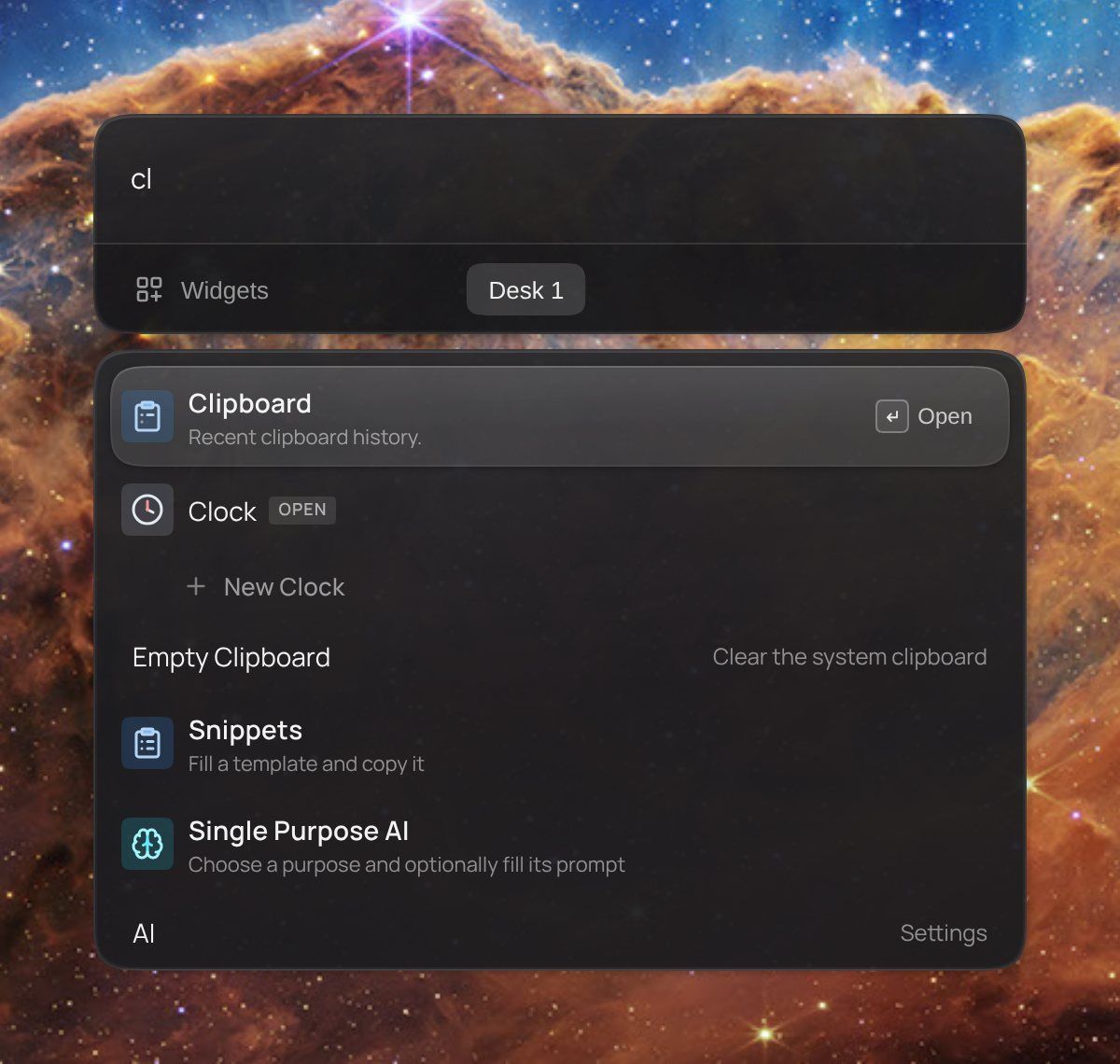
| Key | Does |
|---|---|
Ctrl Ctrl | Show / hide the cockpit |
Shift+Ctrl+Space | Show / hide on the screen under the mouse |
Ctrl+Space (hold) | Peek at the widgets, no palette. Click one while holding and it stays |
Ctrl+Shift+Q | Quick actions on text selected in any app — translate, fix grammar, rewrite |
↑ ↓ Enter | Move through results; on a widget row, put it on the desk |
Ctrl+Enter | Open a widget inside the palette instead of adding it to the desk |
Tab | Fill in an action's arguments, or jump into the widget |
Ctrl+Shift+1…9 | Switch desk |
Ctrl+Z / Ctrl+Y | Undo a hide, delete or move |
Escape | Hide it |
Every other key
↓ on an empty query | Recently used commands |
← on an empty query | The widgets on this desk, plus the whole catalog |
Ctrl+N / Ctrl+W / Ctrl+H / Ctrl+R | On a palette row: new instance / close (hide) / delete |
Ctrl+T | On a folder row: open it in the terminal |
Ctrl+Tab / Ctrl+Shift+Tab | Cycle focus through the open widgets and back to the palette |
Ctrl+Alt+S | Jump into the palette search from any widget |
Ctrl+S / Ctrl+D | On the widget you are in: pin or unpin / duplicate |
Ctrl+W / Ctrl+H / Ctrl+R | On the widget you are in: close/hide / delete it, content included |
Ctrl+Shift+←↑→↓ | Nudge the focused widget by 10px |
Ctrl+Alt+←↑→↓ | Move the active widget or palette by one grid gap |
Ctrl+mousewheel · pinch | Zoom a widget's content (0.5…3), remembered per card |
Ctrl+drag | Move the whole layout instead of one widget |
| Double-click a title | Rename the widget |
Hold Ctrl for 750 ms in the palette or the active widget to reveal
the pin/hide and desk shortcut hints. A widget you deleted comes back from
Ctrl+Z empty.
Widgets & accounts
31 widgets ship with the app, plus two palette-only actions. Add one from the command palette or from the Widget Gallery widget.
- Productivity
- Alarm · Clipboard · Clock · Focus Tracker · Moodist · Notes · Single Purpose AI · Pomodoro · Snippets · Stopwatch · Time Tracker · Timer · Todo
- Information
- Calendar · GitHub Actions · Spotify Playlists · Stocks · Tado · Weather
- Tools
- Calculator · Color Picker · Emoji Picker · Widget Gallery · Redacted · Snake · Widget Wizard
- System
- AI Usage · Launcher Buttons · System Info
- Media
- Image · Now Playing
- Actions
- Confetti · Kill Port
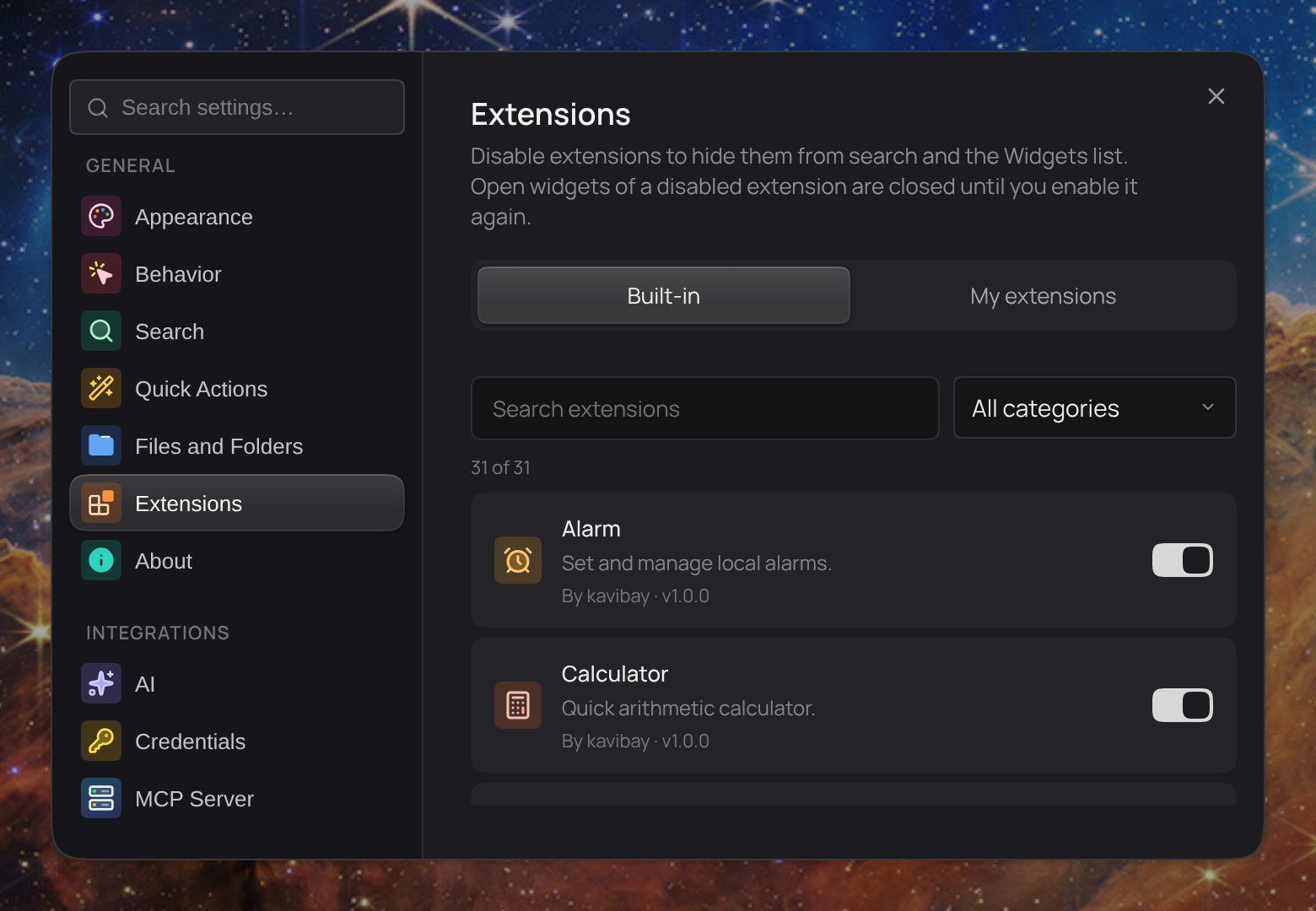
Accounts are entered once in Settings → Integrations → Credentials. One saved account is a connection, and a platform may have several — one Linear workspace for work, one for home. Which connection a widget uses is chosen per widget in its settings; a deleted connection never silently falls back to another account. Linear, Notion, n8n and Fitbit have no widget of their own: a widget you build with the Wizard reads from them.
Full catalogue with what each widget needs: extensions/README.md.
AI features
Kavibay ships no model and no subscription. Use your own API key, or an AI client you already run, connected over MCP.
Bring your own key
Add an Anthropic, OpenAI or Cloudflare Workers AI key under Settings → AI — the same encrypted store as every other credential — and choose which models to switch on. You pay the provider directly, per use. The key unlocks:
- Widget Wizard — describe a widget, get a sandboxed one built (Anthropic or OpenAI).
- Quick actions (
Ctrl+Shift+Q) — translate, fix grammar or rewrite selected text in any app. - Single Purpose AI — a widget for one prompt you run often, with streaming output.
The key stays in Rust. A widget that uses a model asks the host to make the call and never sees the key.

Use the client you already have
Claude Code, Codex or another MCP client can build widgets on its own plan, with no API key in Kavibay — see MCP server.
Build your own
Every widget is an extension, and there is no registry file to edit — the host scans folders, and the folder name is the extension's id. Three ways in:
For compiled extensions, pick the smallest tier that fits — going up later is cheap, and most widgets never leave S:
| Tier | When | Backend |
|---|---|---|
| S | Client-only, or one plain API call | None, or a declared endpoint in api.json |
| M | Per-instance settings, menus, richer UI | Same as S |
| L | Streaming, pagination, shared cache, OS APIs | Its own Rust module |
Widget Wizard
Add the Wizard from the palette and describe what you want — “a tracker for how much water I drink today”. It generates a runtime package, previews it in the same sandbox every package gets, and Save moves it into your widgets. You can watch a recorded run in the browser.
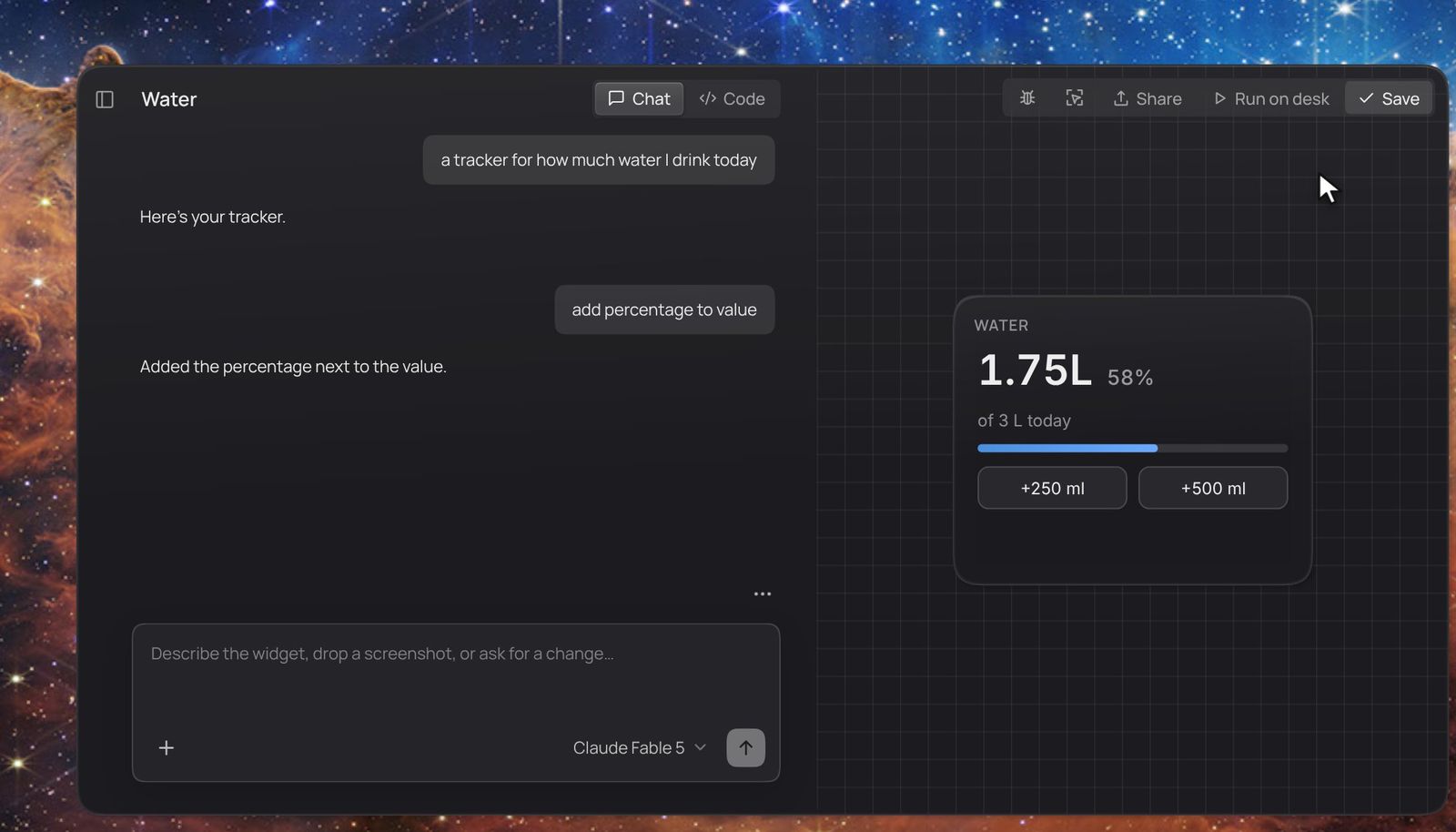
- Your sentence goes to the model, with the package format and the house style as its system prompt.
- Files are written to a draft under
~/.kavibay/extensions-custom/.drafts/. - A live preview runs the draft in the sandbox. Ask for changes as often as you like.
- Save promotes it to
~/.kavibay/extensions-custom/, and it appears in the palette like a built-in widget.

- The left column lists projects: a widget plus every conversation about it. Pick one to change it — the Wizard checks it out into a draft, and Save replaces it in place.
- After each generation, up to three suggestion chips propose a next change. Clicking one adds it to the input; nothing is sent until you press Send.
- Share exports the widget as a ZIP, captures a screenshot, or records a short MP4 clip. Someone else installs the ZIP with Import Widget in the palette, or by dropping it onto Kavibay.
- The Wizard can only write into its own drafts directory — it cannot reach a widget you already installed. Results vary with the model; asking for a fix or two is normal.
MCP server
Kavibay runs a local MCP server inside the app, on by default, at
http://127.0.0.1:43127/mcp. A client you already use writes and validates
drafts; you review the preview in the Widget Wizard and press Save.
Configure it under Settings → Integrations → MCP Server. Kavibay must be
running while the client connects.
Claude Code
claude mcp add --transport http kavibay http://127.0.0.1:43127/mcpCodex
codex mcp add kavibay --url http://127.0.0.1:43127/mcpAny other client: add a custom Streamable HTTP server with the same URL. If you change the port, change it in the URL too — a port conflict is reported, never moved silently.
MCP can read the authoring guides and provider schemas, list, read,
write, edit and validate drafts, and check out a saved custom widget into a new draft.
It cannot save, enable or delete a widget, grant permissions, call a
model or read credentials. The server binds to IPv4 loopback only, rejects requests
with an Origin header, and has no authentication — never publish the URL
through a tunnel or proxy.
Runtime packages
A runtime package is a folder you drop into ~/.kavibay/extensions/. It
renders in a sandboxed iframe and talks to the host through one small bridge. Packages
are untrusted by design: the host holds the secrets, makes the network
requests, and shows you exactly what a package declared before you enable it.
my-widget/
  manifest.json
  api.json            # only if you need network data
  ui/
    index.html
    app.js
manifest.json
{
  "id": "my-widget",
  "name": "My Widget",
  "version": "1.0.0",
  "description": "What it does, in one line.",
  "ui": {
    "entry": "ui/index.html",
    "defaultOffset": { "x": 0, "y": 0 },
    "defaultSize": { "w": 260, "h": 180 }
  },
  "commands": [],
  "permissions": ["storage.instance"]
}
The folder name must equal manifest.id. Then enable
Settings → Behavior → Developer Extensions, open Settings → Extensions →
Runtime packages, Rescan, and enable your package.
What the sandbox forbids
These fail silently — a widget that renders as an empty box, or a button that does nothing, is almost always one of them:
- No inline
<script>and noonclick="…". Code goes in a.jsfile, events viaaddEventListener. - No scripts, fonts or stylesheets from a CDN. Everything ships in the package; inline
<style>is fine. - No
fetchorXMLHttpRequest. Network data comes from declared endpoints. - No
localStorage, cookies or IndexedDB — the frame has an opaque origin. Usekavibay.storage. - No form submission: a
submithandler never runs. Listen forclickand Enter instead. - No pop-ups or navigation:
window.openandtarget="_blank"do nothing.
The SDK
Load it from the host, then your own script. Do not copy it into your package — the host serves that path itself, so every package runs the current version.
<script src="@kavibay/runtime.js"></script>
<script src="app.js"></script>
// Per-instance storage (permission: storage.instance)
await kavibay.storage.set({ city: "Berlin" });
const saved = await kavibay.storage.get(); // null when nothing is stored
// Declared HTTP (permission: network.declared + api.json)
const res = await kavibay.http("forecast", { latitude: 52.52, longitude: 13.405 });
if (!res.ok) return showError(res.code);
render(res.data);
// Bring the widget to the front (permission: background.pop)
await kavibay.pop({ sound: true });
Storage is namespaced to your package and the widget instance. Render from
defaults immediately and redraw when storage answers; save the whole state after every
change, because set replaces what is stored.
Network: declare, don't fetch
Endpoints go into api.json, and the host calls them for you. The
description is shown to the person before they enable your package —
write it for them.
{
  "schemaVersion": 1,
  "endpoints": [
    {
      "id": "forecast",
      "description": "Reads the current temperature for a location from Open-Meteo.",
      "method": "GET",
      "url": "https://api.open-meteo.com/v1/forecast",
      "query": {
        "latitude": { "type": "number", "required": true },
        "longitude": { "type": "number", "required": true },
        "current": { "type": "const", "value": "temperature_2m" }
      },
      "cache": { "ttlSeconds": 600 },
      "rate": { "minIntervalSeconds": 60 }
    }
  ]
}- The target is fixed. Nothing a caller passes can change scheme, host or port, or add a path segment.
- No redirects, no private network. Loopback, private, link-local, CGNAT and ULA addresses are refused.
- Bounded. 10 s timeout, 1 MiB response cap, four concurrent calls, your declared interval and 500 calls per day.
- Credentials without holding them. Set
credentialto a type such asgithubPat; the host attaches the person's granted account to your declared request only. You get the response, never the token. - Changing
api.jsonrequires re-consent. Until the person has reviewed the new endpoints, calls returnconsent_stale.
Validation fails closed: an unknown key, an endpoint id with a dash
(review_requests, never review-requests), an
http:// URL, an IP-literal host or an Authorization header
rejects the whole package. Not supported on purpose: streaming, WebSockets, pagination
loops, request chains, file uploads, arbitrary headers.
Everything else — parameter types, error codes, versioning, the security probes — is in runtime-packages.md.
Contract packages
The second package format, for widgets that read from a provider — a connected account like tado° or Linear, or an open data source. A provider is credentials, refresh, caching and rate limits, all in the host; the package gets a typed handle to queries somebody already wrote.
| The widget needs | Format |
|---|---|
| A connected account — anything with a login | Contract package |
| A public URL, or nothing but its own stored state | Runtime package |
A contract package is manifest.json, index.html and
widget.js, with no build step. The manifest lists the providers in
widget.requires.providers — always a list — together with the queries it
reads and the actions it calls. The person ticks which accounts it may use.
Details and the rules that fail silently:
contract-packages.md;
what each provider returns:
provider-schema.md.
Your data & security
Everything durable sits in ~/.kavibay
(%USERPROFILE%\.kavibay), outside the Windows roaming profile.
| What | Where |
|---|---|
| Settings, meant to be edited by hand | settings.json |
| Layout, desks, appearance, per-widget settings | web-storage.json |
| API keys and OAuth tokens — encrypted | credentials.db |
| Runtime packages you installed | extensions/ |
| Widget Wizard drafts and saved widgets | extensions-custom/ |
| Regenerable caches — safe to delete | cache/ |
- Secrets are encrypted at rest with Windows DPAPI, bound to your account, so a copied file is unreadable elsewhere. A key is never returned to the interface and leaves Rust only towards its provider.
- Widgets never see a credential. They get a handle and learn only whether they are connected.
- Packages run sandboxed — scripts only, no same-origin access, no direct network. Permissions fail closed: a missing permission list means deny.
- Where the protection stops: encryption at rest defends against someone taking the file, not against code running as you. The http allowlist of a package is not a security boundary either — a widget allowed to reach an API can encode what it read into the request. Install packages you trust.
Found a vulnerability? Please use private vulnerability reporting rather than a public issue.
Build from source
You need Windows 10 or 11, Node 22.13+ with pnpm (corepack enable), stable
Rust via rustup, and Visual Studio Build
Tools with Desktop development with C++. The Tauri CLI comes from the project's
dependencies.
git clone https://github.com/kavibay/kavibay
cd kavibay
pnpm install
pnpm run tauri dev
The first run compiles the Rust backend and takes a few minutes; later runs are fast and the interface hot-reloads. To package it yourself:
pnpm run package:win              # NSIS installer
pnpm run package:win:standalone   # single .exe
Contribution paths and what CI checks: CONTRIBUTING.md. Experimental Linux and macOS notes: getting-started.md.
Troubleshooting
| Symptom | Fix |
|---|---|
| App runs, nothing visible | Working as designed — tap Ctrl twice |
Ctrl+Space does not peek | Another app grabbed the hotkey |
| A package shows an empty box, or a button does nothing | Check what the sandbox forbids — inline scripts and form submits fail silently |
| A package forgets everything on reload | Declare storage.instance in manifest.json |
| A new widget folder does not show up | The folder name must equal the manifest id; rescan, or restart the dev command |
Port 1420 is already in use | Kill the other dev server — Tauri needs that exact port |
cargo not found | Fresh rustup install, stale PATH. Open a new terminal |
| Link errors in the Rust build | MSVC build tools are missing |
Still stuck? Bugs go to Issues, ideas and finished widgets to Discussions, and anything else to the feedback form.
Full reference
The complete docs live next to the code:
- getting-started.md — toolchain, every command, troubleshooting
- architecture.md — window, palette, host, sandbox, credentials
- widget-tutorial.md — hello world in tiers S, M and L
- extensions.md — manifest, persistence, actions, credentials
- widget-wizard.md — generating widgets, and the Wizard's limits
- mcp-server.md — tools, resources and the draft workflow
- runtime-packages.md — bridge, storage, declared HTTP, limits
- contract-packages.md — provider-backed packages
- DESIGN.md — colour, type, spacing: the house style
Adapted from the Kavibay docs, licensed CC BY 4.0.